The Importance of the Dataset

When tackling a deep learning problem, it’s common to instinctively modify an existing architecture to fit the task or even consider designing a new one from scratch.
As highlighted in The ‘it’ in AI models is the dataset, the most significant lever to improve deep learning models relies in the training data rather than the architecture itself. Having data that is well-suited to a precise use case can significantly improve performance of the model for this use case.
Thus, the first question to ask is “What will be my model’s application cases?”.
For example, in Natural Language Processing (NLP), it is essential to identify the languages used. As we can see from these metrics, models trained in English are not necessarily the most effective in other languages. This is an example of domain adaptation as described in this article.
Evaluating the performance of a model trained in English for an other language application will often yield poorer results than if the training had been done directly in this other language.
Furthermore, having high-quality data from the same domain as your application can be beneficial for specializing the model using fine-tuning or LoRA.
Based on this observation, it is recommended to start solving a problem by clearly defining the application cases in order to build your own dataset.
Isn’t building your own dataset too time-consuming?
Indeed, creating a dataset can be tedious, time-consuming, and costly. Data often needs to be manually annotated, for example. To address the annotation challenge, there is a solution: synthetic data.
The idea is to use external models that automatically generate data or labels.
By combining tools provided by Python (or your preferred programming language) with those from pre-existing model APIs, it’s possible to automate dataset creation for a wide range of tasks.
Goal of this article
We present here a pipeline to generate multimodal dataset. The main goal of this pipeline is to work without human annotation.
To illustrate this pipeline, this article proposes automating the creation of a dataset for Visual Information Retrieval and Document Visual Question Answering (DocVQA) for slides in an other language than English. It could be French or whatever, for this example one will use Spanish.
Summary
We aim to create a dataset on a specific use case, with the help of synthetic data. The main goal is to make it with an automtic protocol. Thus it will be possible, with enough resources, to create a dataset with a size as wanted.
- Tasks definition : what is Visual Information Retrieval and DocVQA ?
- Dataset Construction : what is the structure of our dataset example.
- Code : How to construct our dataset.
- Performances : comparison of this method with human annotation
1. Task Definition
Before describing the pipeline in detail, let’s precisely define our use case to select the most appropriate data. We aim to build a dataset of slides in Spanish to train and evaluate models for Document Visual Question Answering and Visual Information Retrieval.
Document Visual Question Answering (DocVQA)
Document Visual Question Answering is the task of answering a question based on a visual document (pdf, slide, etc.).
We input an image and a question, and the output is an answer. Thus, our dataset must include slide images as well as a question/answer feature.
Visual Information Retrieval
Visual Information Retrieval is the task of identifying, from a large set of documents and a question, which documents can answer the question.
2. Dataset Construction
To build a suitable dataset, we propose the following pipeline:
- Selecting a source of Spanish slides and retrieving raw data.
- Generating questions/answers using the API of a text/image model (Gemini, Claude, ChatGPT, etc.).
- Organizing the collected and synthesized data into a shareable format.
- Filtering the data to remove low-quality samples.
We use a copyright-free presentation slide website like Slideshare.net as our data source. It’s possible to select the language used in the presentations, making it a perfect fit for our problem.
Synthetic Data Challenges
The automation of this process is made possible by combining two elements: automatic data collection via scraping methods and automatic data generation through a VLM. These synthetic data are an asset for building your dataset, as they offer:
- Time savings: The model API generates questions/answers automatically.
- Financial savings: No need for human annotation of the data.
This challenge is highlighted in the paper ChatGPT outperforms crowd-workers for text-annotation tasks.
Dataset Organization
A presentation consists of one or more slides. After analyzing the available data for each slide presentation, we profile our dataset to include the following features:
| Feature | Description |
|---|---|
| id | unique identifier for the presentation |
| presentation_url | URL of the presentation on slideshare.net |
| title | presentation title |
| author | slideshare.net username of the author |
| date | date in YYYY-MM-DD format |
| len | number of slides in the presentation |
| description | presentation description |
| lang | language specified by the author |
| dim | slide dimensions (HxW) |
| likes | number of likes on the presentation |
| transcript | list of slide text transcripts |
| mostRead | True for the most-read slides, False for others. |
| images | list of all slide images in the presentation |
| questions/answers | list of dictionaries containing question/answer pairs for each slide |
This list contains question/answer pairs for each slide (one slide may have multiple question/answer pairs).
3. Code
For the example, we will collect and annotate a hundred documents, but the code can easily be scaled up to handle thousands of documents by letting it run longer.
We use 3 Python notebooks and a Python script available at the following link github/alexandremyara/deep_learning. The code is organized as follows:
scrap.ipynb: This notebook retrieves the download links for the different presentations and then downloads each slide one by one.generate_qa.ipynb: This notebook generates one or more question/answer pairs for each downloaded slide.filter.ipynb: This notebook loads the dataset and removes question/answer pairs that are too short or presentations with too few slides.
Finally, dataset.py generates the dataset in HuggingFace’s dataset format.
Scraping
Using a Python module, we make requests to the presentation site. We retrieve URLs for various presentations containing the keyword “Spanish”.
Once these URLs are collected, the slides are downloaded. Each slide presentation is stored in a folder that contains all the slides for that presentation.
We also save a .json file containing the presentation metadata (title, author, ID, etc.).
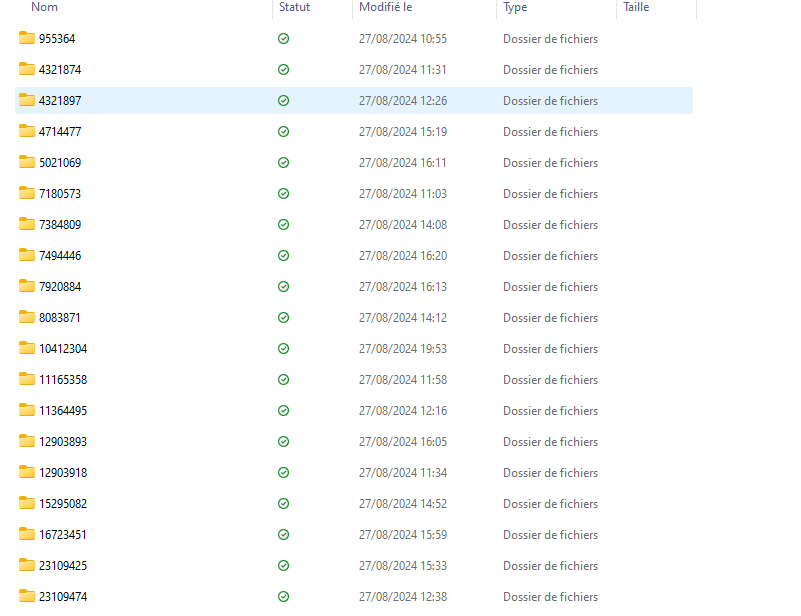 Folders contain slides and metadata for each presentation
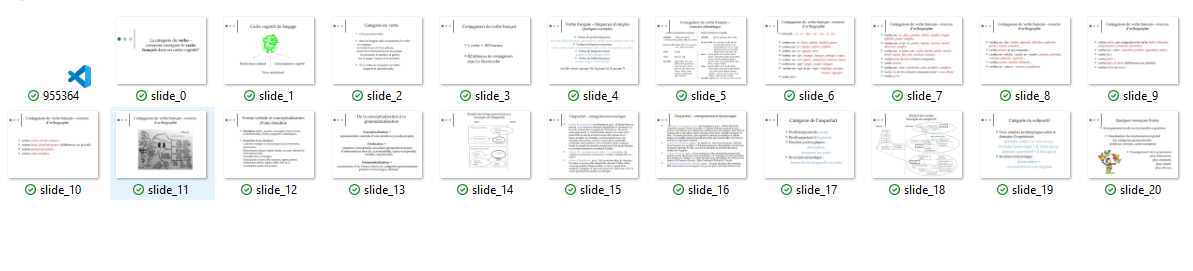 Folders contain slides and metadata for each presentation
Question/Answer Generation
Now we generate the synthetic data, specifically the question/answer pairs for each slide. To do this, we select a VLM with an API offering free access.
For example, we could use the Claude or Gemini API.
Once the model is chosen, we input the slides along with a prompt, such as:
prompt = "Generate a question-answer pair in the format {question:, answer:}. The question should be based on the slide and be instructive, using visual elements to form the question and answer."

To meet the needs of Visual Information Retrieval, the generated questions/answers (synthetic data) must focus on specific or unique elements of the slide.
We verify that each question/answer pair clearly identifies the corresponding slide.
For each presentation, we store the list of question/answer pairs in .json format in the folder associated with the presentation.
Dataset Format
Once the data is collected, we generate the dataset in Dataset format and save in a parquet file. To do this, we use a script with Python Generator to generate a HuggingFace dataset. The dataset example is available at .
The dataset can then be loaded using HuggingFace’s load_dataset function and used for model evaluation, for example.
Data Filtering
To improve data quality, it may be necessary to check the relevance of the synthetic data. We manually review a few question/answer pairs and check their consistency with the corresponding slide.
Next, we exclude any presentations that:
- Have a question or answer with fewer than 10 characters.
- Have fewer than 3 slides.
At this point, our dataset is of higher quality.
4. Performance
Let’s discuss the performance of this approach and the relevance of using synthetic data.
Scraping Time
Slides were retrieved using HTTP requests. With Python, it’s possible to retrieve 10 presentations with 20 slides each, along with their metadata in .json format, in 12 minutes. This time includes pauses to avoid overwhelming the site with requests.
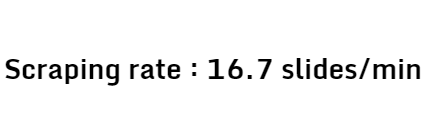 Manual downloading would take longer, given the need to organize the metadata. Thus, this approach offers the first time-saving advantage.
Q/A Generation Time
The biggest strength of this method is the use of synthetic data. Typically, data annotation involves paying crowd workers for the more mechanical tasks.
Based on platforms like Amazon Mechanical Turk or Appen, we can estimate human annotation at a minimum of $0.50.
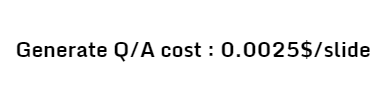
Thus, for 10 presentations with 20 slides, the cost is around $100. In comparison, the synthetic annotation of 10 presentations with 20 slides using the Claude 3.5 Sonnet API costs us \$0.50.
For 200 pairs of synthetic questions/answers, the Gemini API takes 4 minutes, which is, in all likelihood, faster than human annotation.

Conclusion and Scaling
We have successfully generated a dataset for a specific application of Document Visual Question Answering and Visual Information Retrieval using synthetic data.
Here a summary of performances.
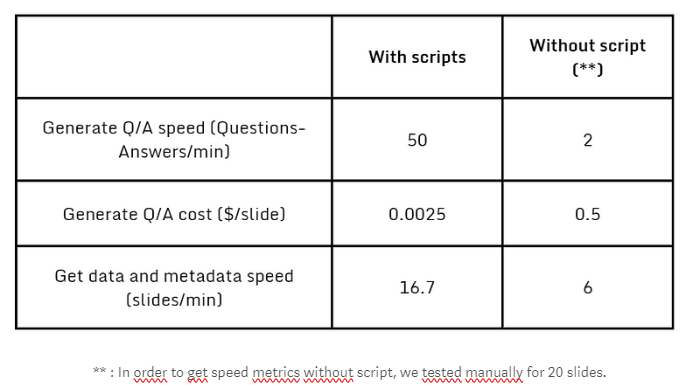
In addition to time savings due to automation, we also note the financial cost, which favors synthetic data. To assess the performance of the approach, we ultimately generated a dataset of 3,000 slides. The quality of synthetic data allowed us to retain 77% of the generated question/answer pairs after filtering based on the length of the returned response.
This protocol enables the construction of a larger dataset if the data retrieval and synthetic generation times are increased.
This dataset, which closely mirrors real-world applications, will optimize the evaluation of our models.